

Solve problems with your voice.
Practise one voice problem at a time.
Voice Trail
- Overview
- Pauses
- Pitch
- Energy
One thought. Then the next.
How Ptichi helps
Your words. One useful change.
Ptichi helps you name a speech or voice problem, practise one useful change and hear whether it helped.
Try one voice exerciseAvailable now
Try it here, today.
Rushing words. Flat delivery. Fading endings. Published exercises and guides are free, without an account.
Free web exercises · Desktop app in development
Explore texts & programmesPublished web texts · Guided desktop programmes in development
Record → Listen → One change → Compare → Transfer
Record
Say something you actually need to say.
Listen
Hear the whole take. Pick one problem.
One change
Try one cue and make a second take.
Compare
Which version is easier to follow, with less effort?
Transfer
Try the same idea with new words.
Use your usual recorder for listening back. This website does not record audio.
See development plansBrowse practical guides
Need to prepare what to say? Make a short speaking plan
Questions before you begin
What you can do now, what the signals mean, and where the limits are.
What voice problems can I work on?
Start with something you can hear: rushing, unclear words, flat delivery, fading sentence endings or a point that gets lost in detail. Ptichi connects these concerns to a bounded exercise; it does not diagnose their cause.
Start from your recorded voiceWhere should a beginner start?
Choose one short exercise and a message you already understand. Say it naturally first, then try one cue; you do not need specialist vocabulary, a new microphone or a polished performance.
Open a first exerciseWhat does one practice session look like?
Record Take A with your usual recorder and listen to it in full, then choose one change and record Take B. Compare by ear and try the same intention with new words, so you are practising more than one memorised sentence.
What is different about the Ptichi approach?
Ptichi starts from a speaking problem and the words you need in real life. It uses comparison between your own attempts and one useful cue at a time, with clear limits on what an acoustic signal can tell you.
What is available now, and what is still in development?
The published web exercises, guides, reading texts and English speaking-plan helper are available now without an account. Desktop recording, local history, voice signals and guided programmes are in development; there is no public installer yet.
See current availabilityWhat does Voice Trail show?
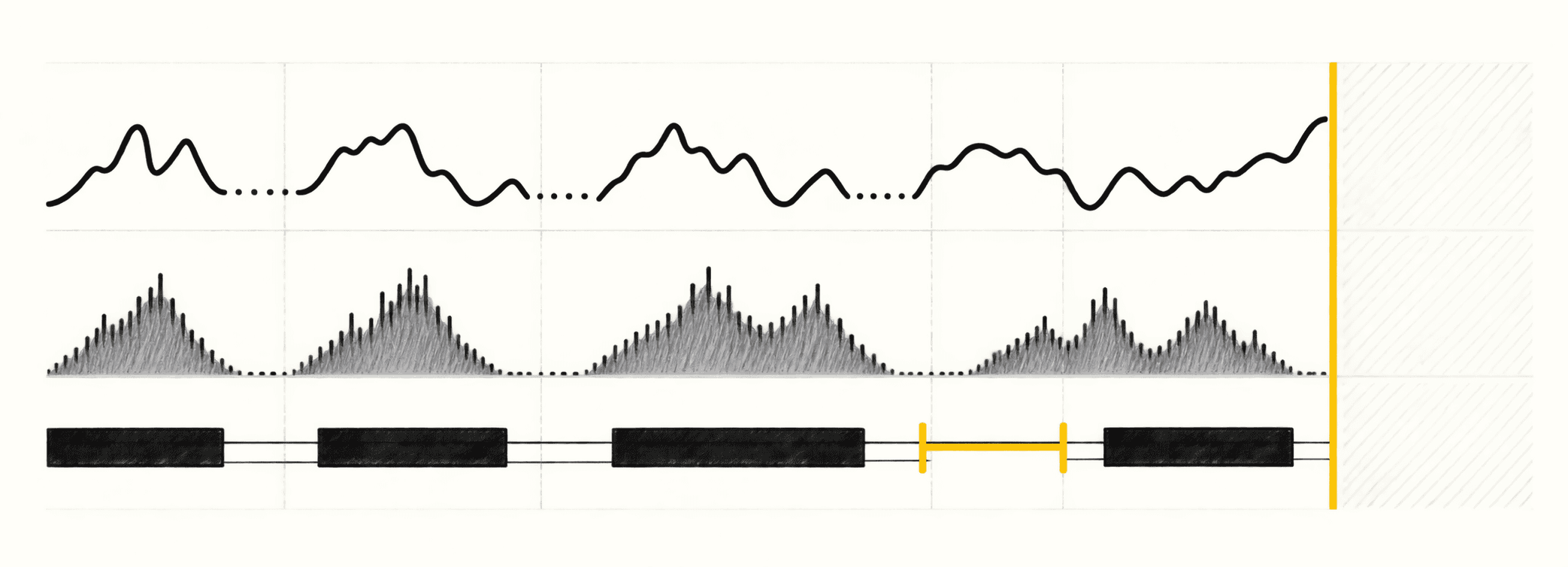
The preview illustrates the desktop direction: an experimental pitch trace, input level and level-based activity over time. It is an illustration, not your recording, speech recognition or a measurement result; the website does not analyse your voice.
What do the five birds mean?
Core is for listening, Clear for clarity, Ritmo for pace, Proud for projection and Bold for emphasis. They are practice lenses that help you choose what to notice, not personality types or automatic ratings.
Will Ptichi give me a voice or confidence score?
Ptichi does not offer a global voice, confidence or personality score. A level, pause or pitch observation describes a limited part of a recording; it cannot establish whether your message helped the listener.
How can I tell whether a change helped?
Compare the two takes against your original problem: can you catch the words, hear the contrast or follow the point more easily? Check your effort and try new wording too; one better take is not proof of lasting learning.
What happens to my recordings and text?
The website does not capture audio, and its text-only helper works in the current tab. The desktop app is being built to keep recordings and core analysis on the device by default; exports and diagnostic sharing require an explicit action, and website analytics has its own consent boundary.
Read the privacy boundariesCan I practise offline?
Once you have a text and a recorder, the read–listen–compare exercise can be done without this website. Desktop practice is being developed for local use, but that design direction is not a released offline app.
Why does the website not ask for a microphone?
The website explains the problem and gives you an exercise; the separate desktop project develops recording and device feedback. For web practice, use a recorder you already have and keep control of your audio.
Can I use my own scripts or everyday conversations?
Yes: apply the published exercise to a short explanation, story, conversation or text you actually need to say. Keep the listener's goal, change one thing and try new words; you do not need to copy a presenter's style.
How do Metkagram and Vedokrok fit in?
Metkagram is a bundled, owner-permitted local reading module in the desktop development build, with its text, annotations and attribution preserved. Vedokrok is planned, with no active connector or import here; neither statement means a public desktop release is available.
Which languages does Ptichi support?
Guides and exercises are available in English, Russian and German. The homepage also introduces Ptichi in Spanish, French, Portuguese, Chinese, Japanese, Arabic, Hindi and Indonesian. The speaking-plan helper is English-only. A translated homepage does not establish validated voice analysis or coaching in that language.
Can I install Ptichi on Windows or macOS?
Public installers are not available yet. The engineering targets are macOS on Apple Silicon and Windows 11 x64; compatibility and release availability will be published after the relevant checks.
Follow development